

Google Word Coach: The Fun Way to Boost Your Vocabulary and Language Skills
Introduction
In today’s digital world, search engines are not just about finding information; they also serve as learning platforms. Google has consistently introduced new tools to make learning more accessible and enjoyable. One such tool is Google Word Coach — a fun, interactive, and highly effective way to improve your English vocabulary and language skills right within the search engine itself. Whether you’re a student, a professional, or someone preparing for exams like TOEFL, IELTS, or GRE, Google Word Coach offers a simple and engaging approach to word learning.
In this article, we’ll dive deep into what Google Word Coach is, how it works, who it’s designed for, its key features, and how you can leverage it to enhance your language proficiency.
What is Google Word Coach?
Google Word Coach is a vocabulary game introduced by Google to help users improve their English vocabulary directly from search results. Launched in 2018, it is primarily accessible via mobile devices and the Google app. The tool presents users with multiple-choice questions related to word meanings, synonyms, antonyms, and word usage.
Unlike traditional dictionary searches that only show word definitions, Google Word Coach takes learning a step further by testing your knowledge and providing instant feedback. This game-like format makes vocabulary building less monotonous and more entertaining.
How to Access Google Word Coach
Accessing Google Word Coach is incredibly simple:
-
Open Google on your mobile device or through the Google app.
-
Type “Google Word Coach” in the search bar.
-
Alternatively, search for any word’s definition, and sometimes the Word Coach quiz appears underneath.
Currently, it’s most prominently featured in non-English speaking countries where Google recognizes a higher demand for English language learning. However, many users globally can still access it through simple search queries.
Key Features of Google Word Coach
1. Interactive Vocabulary Game
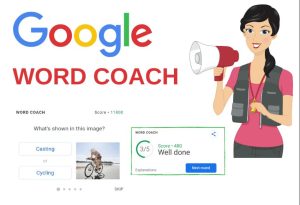
Google Word Coach transforms vocabulary practice into a quiz game. Each round presents multiple-choice questions where you choose the correct answer. The questions may involve:
-
Synonyms
-
Antonyms
-
Word definitions
-
Image-based word associations
-
Contextual word usage
2. Instant Feedback
After each question, Google provides immediate feedback, explaining the correct answer and offering brief explanations. This reinforces learning and helps users understand their mistakes.
3. Level-Based Progression
The questions become progressively more challenging as you answer correctly. This adaptive difficulty ensures that both beginners and advanced learners can benefit.
4. Scoring System
Google Word Coach assigns points for each correct answer, making the experience more gamified and encouraging users to aim for higher scores.
5. Lightweight and Accessible
Unlike apps that require downloads, Google Word Coach is accessible right from your browser or Google app, making it convenient and lightweight.
Why Google Word Coach Stands Out
Gamified Learning Experience:
Traditional vocabulary learning can often feel dry and repetitive. Google Word Coach breaks this mold by introducing gamification. Competing against your previous scores motivates users to continue learning without feeling pressured.
Short, Snackable Sessions:
Each quiz can be completed in just a few minutes, making it perfect for busy individuals who want to practice during short breaks or commutes.
Personalized Difficulty:
By adjusting the difficulty level based on performance, the tool keeps users challenged but not overwhelmed.
No Cost Involved:
Google Word Coach is completely free, removing any financial barriers to language learning.
Supports Multiple Learning Styles:
Whether you learn better through visual cues, contextual understanding, or direct definitions, Google Word Coach caters to multiple learning styles.
Who Can Benefit from Google Word Coach?
1. Students
Students preparing for standardized tests like SAT, GRE, TOEFL, or IELTS will find Google Word Coach immensely helpful for improving their vocabulary.
2. Professionals
Non-native English-speaking professionals can strengthen their language skills to better navigate international work environments.
3. Casual Learners
Anyone who enjoys learning new words or improving their command of the English language can use Google Word Coach as a fun daily habit.
4. Educators
Teachers and language instructors can recommend Google Word Coach to students as a supplementary learning tool.
Tips to Maximize Your Learning with Google Word Coach
Set a Daily Goal:
Aim to play Google Word Coach daily, even if only for a few minutes. Consistency is key to building vocabulary.
Keep a Vocabulary Journal:
Note down new words, their meanings, and example sentences to review later.
Review Mistakes:
Pay attention to the feedback provided after incorrect answers. Understanding why an answer was wrong helps avoid repeating the same mistake.
Combine with Other Tools:
Use Google Word Coach alongside apps like Duolingo, Memrise, or Anki for a well-rounded vocabulary learning experience.
Challenge Friends:
Make it more engaging by challenging friends or classmates to beat your score, creating a healthy competition.
Limitations of Google Word Coach
While Google Word Coach is a fantastic tool, it’s important to recognize its limitations:
-
Mobile-Focused: It’s primarily available on mobile devices and may not always appear in desktop search results.
-
Limited Depth: Though great for vocabulary, it doesn’t cover comprehensive language skills like grammar, writing, or speaking.
-
No Progress Tracking: There’s no account-based system to track long-term progress or revisit previous questions.
Despite these minor drawbacks, Google Word Coach remains one of the simplest and most engaging free vocabulary tools available.
The Future of Google Word Coach
Given its popularity and the growing demand for online learning tools, there’s potential for Google to expand Word Coach features in the future. Possible improvements might include:
-
Desktop compatibility
-
Progress tracking
-
Expanded question formats
-
Integration with Google accounts for personalized learning paths
-
Support for additional languages
If Google chooses to develop these features, Word Coach could evolve into a more robust language learning platform.
Conclusion
Google Word Coach exemplifies how technology can make learning both effective and enjoyable. By blending education with gamification, it encourages users to build their vocabulary in a stress-free environment. Its accessibility, simplicity, and instant feedback system make it a standout resource for learners of all ages and backgrounds.
Whether you’re looking to brush up your vocabulary for professional reasons, academic exams, or personal growth, Google Word Coach offers a powerful and entertaining tool to help you succeed. And since it’s entirely free and accessible anytime, there’s really no excuse not to give it a try.
FAQs on Google Word Coach: The Fun Way to Boost Your Vocabulary and Language Skills
Q1: What is Google Word Coach?
Google Word Coach is a free vocabulary game by Google that helps users improve their English skills through interactive quizzes on word meanings, synonyms, antonyms, and usage.
Q2: How do I access Google Word Coach?
Simply type “Google Word Coach” in the Google search bar (mainly on mobile or the Google app), and the quiz will appear directly in the search results.
Q3: Is Google Word Coach free to use?
Yes, Google Word Coach is completely free and doesn’t require any app download or subscription.
Q4: Who can benefit from Google Word Coach?
Anyone looking to improve their English vocabulary — students, professionals, and casual learners — can benefit from this tool.
Q5: Does Google Word Coach track my progress?
Currently, Google Word Coach does not have a feature to track long-term progress or maintain user history.
Q6: Can I use Google Word Coach on desktop?
It’s primarily designed for mobile, but it may sometimes appear on desktop browsers depending on the region and search query.
Q7: What makes Google Word Coach effective?
Its gamified approach, instant feedback, and progressively challenging questions make vocabulary learning engaging and effective.


