Motion Without the Migraine: Animated Mockups Without After Effects
Open After Effects for the first time and you meet a timeline, a pile of layers and a render queue that sounds like a jet engine. It’s brilliant software, but if you only need a phone screen to glide into frame for a Reels post, it’s like renting a crane to hang a picture.
Why a Moving Mockup Beats a Still One
A static image asks people to imagine your product. A short loop simply shows it. In a feed, motion is what stops the thumb mid-scroll, and a rotating device with your app on its screen tells the viewer “this is real” within two seconds.
Portfolios gain too. Clients scrolling through a Behance or Dribbble page see dozens of flat rectangles, and the one project with a smooth device reveal is the one they remember when it’s time to hire.
Where motion pays off:
- Social posts and stories: short 5-8 second loops for Instagram, TikTok and LinkedIn
- Case studies: a hero animation sitting at the top of a project page
- Launches: a moving product shot for a Product Hunt listing or a pitch deck
- Client approvals: showing a design in context before a single line of code is written
The Old Route and Its Hidden Costs
The classic path looks like this: download a PSD, swap a smart object in Photoshop, import into After Effects, track the layer, set keyframes, light the scene, render. Every step is a chance for a missing font, a broken plugin or a 40-minute export that dies at 95%.
A freelance UI designer finishes a mobile app redesign on Friday evening and wants it live on Instagram before the weekend. Instead, Saturday goes to relearning easing curves she used once, six months ago, for a different client.
A small SaaS team preparing a Product Hunt launch needs a 10-second hero clip of their dashboard rotating into view. Their only motion designer is on vacation, so the launch slips a week waiting for someone who can open a .aep file.
An agency account manager promises a client an animated preview by Monday morning. The render finishes at 2 a.m. with a missing font substituted mid-clip, and the whole sequence has to be rebuilt from scratch.
For freelancers and small teams billing by the project, all of this is unpaid time spent fighting software instead of shipping work.
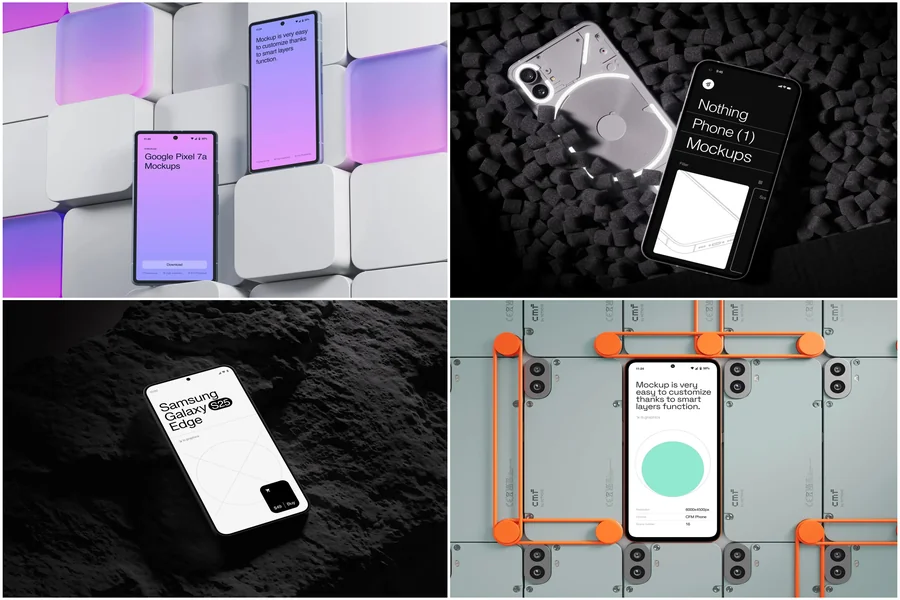
Fortunately, the animation itself doesn’t have to be hand-built anymore. A web app called Live Mockups sidesteps the whole pipeline: it ships with a ready-made library of 300+ animated 3D mockups — iPhone, MacBook, iPad, Nothing Phone and more. You pick a device, drop in your own screenshot or video, and the mockup comes to life on its own, already lit and already moving. From there you choose your finish line — export the result as a video for social media, or embed it directly on your website as a live widget visitors can watch right on the page. No keyframes, no plugins, no render queue eating your afternoon.
Where Animated Mockups Actually Get Used
Once you strip away the render-farm anxiety, animated mockups turn out to be a working tool across a surprisingly wide range of jobs, not just a nice-to-have for portfolios.
Mobile app developers shipping to the App Store or Google Play routinely lead their landing pages with a phone rotating to reveal the interface, because a screenshot alone rarely conveys what scrolling through the actual app feels like.
E-commerce brands selling physical hardware — a smart lamp, a fitness tracker, a kitchen gadget — use a moving product render on the homepage before professional photography is even ready, since renders can go live the same day a design is finalized.
Print-on-demand sellers on Shopify and Etsy, fulfilled through services like Printful or Printify, have no warehouse of finished shirts to photograph, so their listings are built entirely from mockups; the sharper operators now animate the reveal instead of posting a flat product shot, and it noticeably lifts click-through on paid social.
SaaS marketing teams drop an animated laptop mockup into the hero section of a pricing page, letting the dashboard fade or slide into view instead of sitting there as a static screenshot competitors’ pages already look identical to.
Design agencies wrapping up a rebrand add the new identity to a moving mockup — a phone screen, a laptop lid, a branded tee or tote — because a client sees the logo functioning in the real world, not just floating on a color swatch.
A good Mockup is the cheapest photoshoot you’ll ever run, and the team behind ls.graphics has spent years building both static device scenes and the animated library that powers this whole workflow.
Small Details That Make It Look Expensive
A handful of habits separate an animation that reads as premium from one that reads as rushed:
- Match the screen’s aspect ratio — a stretched or cropped screenshot is the fastest way to look amateur
- Keep the on-screen UI simple; a busy interface turns into visual noise once it’s moving
- Trim loops to under 10 seconds and design them to work with sound off, since most feeds autoplay muted
- Reuse the same background tone across a series of posts so your feed reads as one coherent campaign rather than scattered one-offs
The Takeaway
Whether you’re a solo developer pushing an app update, a small brand testing a new product line, or an agency closing out a rebrand, the pattern is the same: the businesses that stopped waiting on a motion designer are the ones publishing this week instead of next month. You don’t need a render farm or a timeline full of keyframes — you need a solid starting image and a tool built for exactly this job. Grab a device, drop in your content, and let it move. The launch, the pitch deck or the feed post that’s due today doesn’t have to wait on software built for feature films.